A survey can look perfect on screen and still hide serious errors. Broken skip logic, mislabeled answers, and quota failures often stay invisible until real respondents hit them. This is why survey programming quality assurance matters so much. It catches problems before they damage your data.
At Linkinfotech, every survey we program goes through a structured QA process before it reaches a single respondent. In this guide, we’ll explain what survey programming quality assurance involves, which checks matter most, and how to build a reliable QA process for your research projects.
What Is Survey Programming Quality Assurance?
Survey programming quality assurance, or QA, is the structured process of testing a programmed survey before launch. Testers verify that every question, logic rule, and data output works exactly as the research team intended.
QA differs from simple proofreading. Proofreading checks wording, while QA checks function. A tester follows every possible path, confirms the right questions appear, and ensures the data records correctly. Therefore, QA protects both the respondent experience and the final dataset.
Strong QA always starts with a reference document. A detailed survey script gives testers a clear standard to compare against, so they can spot any difference between the plan and the build.
Why Quality Assurance Matters in Survey Programming
Errors discovered after launch cost far more than errors caught beforehand. Moreover, flawed data often can’t be repaired once respondents have already completed the survey.
Here’s what thorough QA protects:
- Data accuracy – Correct logic means correct answers recorded.
- Respondent experience – Smooth navigation reduces frustration and dropouts.
- Budget – Fixing errors early avoids wasted sample and re-fielding costs.
- Client trust – Reliable surveys build confidence in your research team.
- Project timelines – Early fixes prevent delays during fieldwork.
Consequently, teams that skip QA often pay for it later through poor data, angry clients, and repeated revisions.
Turn Survey Data Into Business Decisions Faster
Technology-driven market research for faster, smarter insights.
Core Areas of Survey Programming Quality Assurance
Effective QA covers several distinct areas. Each one targets a different type of risk.
Content Accuracy
Testers compare question wording, answer options, and instructions against the approved questionnaire. Even small typos or missing options can change how respondents answer.
Logic and Routing
This check confirms that skip patterns, branching, and termination rules work correctly. Every respondent should land on the right next question based on their answers.
Quota Behavior
Testers confirm that quotas fill, close, and route respondents as designed. A broken quota can quietly ruin sample balance.
Validation Rules
These checks verify that the survey blocks impossible answers, such as ages outside a realistic range, and requires answers where needed.
Data Output
Finally, testers review exported data to confirm variables, labels, and codes match the planned data map.
Testing Tools Within the Decipher Platform
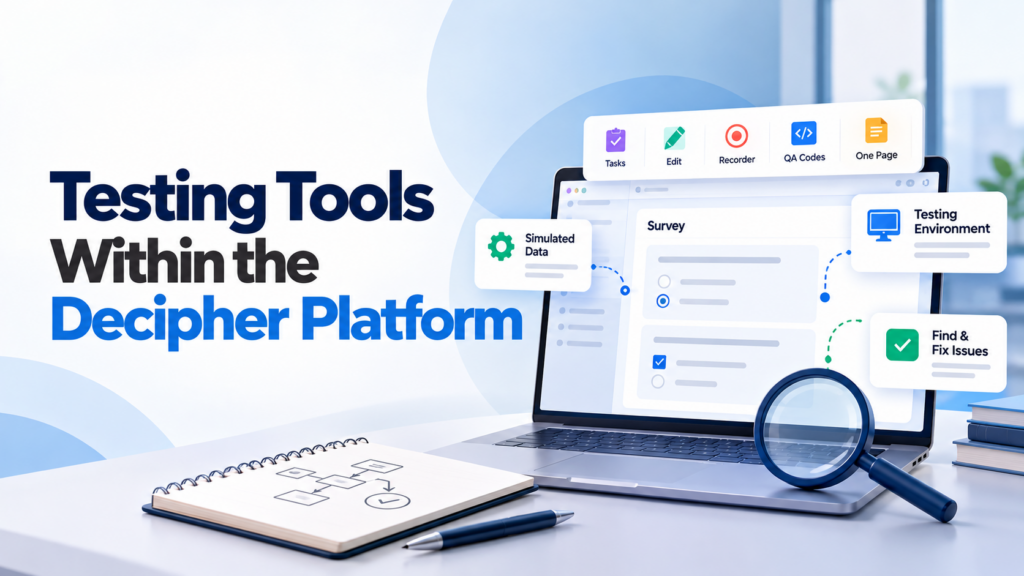
Modern survey platforms include built-in tools that make QA faster and more reliable. For example, the Decipher survey platform offers several testing features designed specifically for this purpose.
Simulated Data
The system can push random responses through the survey to fill the database and expose logic errors. If the survey breaks, the tool displays details about each error, which helps programmers diagnose problems quickly.
The Testing Environment
Testers can view the survey with or without QA tools and enter dummy values to check how URL variables behave.
The Testing Toolbar
This toolbar gives testers several useful options:
- Tasks – Assign and resolve feedback directly on survey pages.
- Edit – Fix text without returning to the main editor.
- Recorder – Save a path through the survey to revisit later.
- QA Codes – Display labels, settings, and conditions beside each question.
- One Page – View the whole survey on a single screen.
Teams new to these features can follow a hands-on Decipher tool tutorial to practice before running real QA cycles.
Step-by-Step QA Process
A consistent workflow keeps QA thorough and repeatable. Most professional teams follow a similar sequence.
Step 1: Prepare the Reference Materials
Gather the final questionnaire, quota plan, and data map. Testers need these documents open throughout the process.
Step 2: Run Simulated Data
Start with automated tests to catch obvious logic breaks. This step finds errors faster than manual clicking.
Step 3: Test Manually Across Paths
Next, testers complete the survey repeatedly, choosing different answer combinations. They check every branch, termination point, and quota route.
Step 4: Review Text and Design
Testers read every screen for typos, missing instructions, and layout problems on desktop and mobile.
Step 5: Check the Data Output
After the test completes, testers review the data file to confirm variables, labels, and values appear correctly.
Step 6: Log and Fix Issues
Teams record every problem, fix it, and retest. Never assume a fix worked without checking again.
Step 7: Run a Soft Launch
A small group of real respondents completes the survey before the full launch. This pilot often reveals issues that internal testing misses.
Multilingual and Device Testing
Surveys rarely run in just one language or on one device. Therefore, QA must cover both areas carefully.
For multilingual projects, testers verify each language version separately. Translated text can run longer than the original, which may break layouts. Moreover, encoding problems can turn special characters into unreadable symbols.
Device testing matters equally. A grid question that works on a laptop may become unusable on a phone. Testers should check multiple screen sizes, browsers, and operating systems before approval.
Turn Complex Datasets Into Strategic Business Growth
Enterprise-grade data processing, statistical analysis, and customized tabulations to power your insights.
Common Problems QA Should Catch
Experienced testers know where errors tend to hide. Watching for these patterns speeds up the process.
- Broken skip logic – Questions appear for the wrong respondents.
- Dead ends – Respondents reach a screen with no valid next step.
- Quota failures – Cells fill incorrectly or never close.
- Mislabeled data – Exported variables don’t match the data map.
- Inconsistent wording – Text differs from the approved questionnaire.
- Mobile display issues – Layouts break on smaller screens.
Careful checking at each stage prevents these problems from reaching live respondents.
QA in Different Research Contexts
QA needs vary by project type. Large-scale market research survey projects, for example, demand extra attention to quotas and sample balance, since errors affect thousands of respondents at once.
Simpler feedback tools also need testing. Even a short service survey form can contain routing errors that confuse customers or skew results. A few minutes of testing prevents those issues.
Good QA also strengthens survey programming as a whole. Programmers who know their work will face rigorous testing tend to build cleaner, better-documented logic from the start.
Monitoring Quality During Fieldwork

QA doesn’t end at launch. Live monitoring catches issues that only appear under real conditions.
Teams should watch completion rates, terminate counts, and dropout points regularly. A sudden spike in dropouts at one question often signals a technical or wording problem. Similarly, unexpected quota behavior may point to a logic error.
Reviewing individual responses also helps. Looking at a handful of completed interviews confirms that data records correctly. These habits support strong data collection and survey practices throughout the entire project.
How QA Supports Better Analysis
Clean data makes analysis faster and more reliable. When QA catches labelling and logic errors early, analysts avoid time-consuming corrections later.
For example, cross-tabulation works best when every variable carries accurate labels and complete responses. Errors in routing can leave gaps that distort comparisons between groups.
Similarly, well-tested data flows smoothly into many data analysis tools. Analysts spend their time finding insights rather than fixing structural problems.
Best Practices for Survey Programming Quality Assurance
- Use a separate tester who didn’t program the survey.
- Test every path, including unusual answer combinations.
- Keep a clear log of every issue and its fix.
- Retest after every change, however small.
- Check mobile and desktop displays separately.
- Review the final data file before full launch.
- Run a soft launch whenever the schedule allows.
Following these habits builds a repeatable QA culture that improves every future project.
Program Complex Questionnaires and Skip Logic
Expert survey scripting, advanced routing, and multi-language configurations for flawless data collections.
Conclusion
Survey programming quality assurance protects the accuracy, reliability, and credibility of your research. By testing logic, quotas, design, and data output before launch, teams catch costly errors while they’re still easy to fix.
Organizations that treat QA as a core step, not a last-minute check, gain cleaner datasets, smoother fieldwork, and stronger client confidence. As surveys grow more complex, this discipline becomes even more valuable.
Ultimately, strong QA doesn’t slow projects down. It prevents the delays and failures that slow them down far more.
Frequently Asked Questions
It’s the structured testing of a programmed survey to confirm that logic, quotas, wording, and data output work exactly as planned before launch.
A fresh tester spots mistakes the programmer overlooks, since programmers tend to follow the paths they already expect.
It’s a feature that sends random responses through the survey to fill the database and reveal logic or flow errors automatically.
Simple surveys may need a few hours, while complex multi-market projects can require several days of testing and retesting.
Yes, monitoring completion rates, dropouts, and quotas during fieldwork catches issues that only appear with real respondents.