

Collecting survey responses is only half the job. The real value appears when you compare groups, spot differences, and turn raw numbers into clear findings. This is exactly where Decipher crosstabs help. They let researchers slice results by segment, review tables quickly, and export polished reports.
At Linkinfotech, we use these reporting tools to help clients move from raw survey data to clear, usable findings. In this guide, we’ll explain what Decipher crosstabs are, how the reporting tools work, and how to use them to find insights faster.
What Are Decipher Crosstabs?
A crosstab, short for cross-tabulation, compares how different groups answered the same question. For example, you might compare satisfaction scores between men and women, or between new and returning customers. The result is a table that shows patterns hidden in overall totals.
Decipher crosstabs bring this technique directly into the survey platform. Researchers open the reporting area, choose a crosstab, and view results without exporting data first. As a result, teams save time and avoid extra software for basic analysis.
The approach mirrors classic statistical methods. If you want deeper background on the technique itself, our guide to cross-tabulation in SPSS explains how the same logic works in other tools.
Why Crosstabs Matter in Survey Research
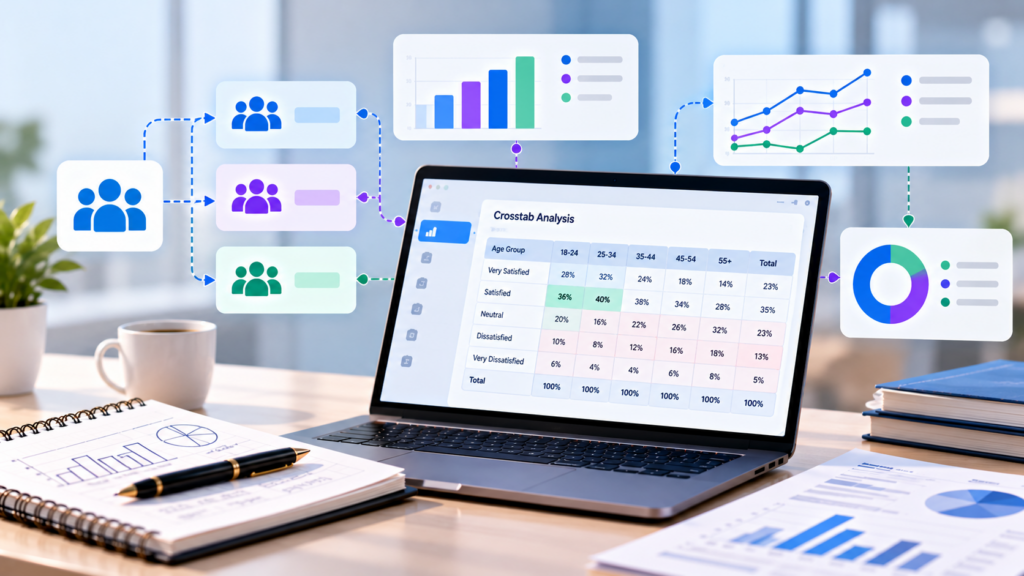
Overall totals rarely tell the full story. A product might score well on average, yet perform poorly with a key audience. Therefore, segment-level comparison is essential for sound decisions.
Here’s what Decipher crosstabs deliver:
- Segment comparison – See how different groups answer the same question.
- Faster reporting – Run tables inside the platform without exporting.
- Cleaner presentation – Review tables with consistent formatting.
- Flexible filtering – Focus on specific dates, groups, or conditions.
- Easy exports – Share results in common office formats.
Moreover, crosstabs help teams spot problems early. An unusual pattern in one segment may point to a sampling issue or a programming error.
Turn Survey Data Into Business Decisions Faster
Technology-driven market research for faster, smarter insights.
Where to Find Crosstabs in Decipher
Within a project, researchers open the report section and select crosstabs. From there, they can run a saved crosstab, create a new one, or perform a quick split. Each option suits a different level of detail.
The main screen includes several useful areas:
- The Crosstabs Menu
This menu holds actions for building crosstabs, creating saved reports, adding tables, and applying weighting schemes. It also controls chart options and view settings. - Quick Split
Quick Split lets you run a different crosstab without leaving the report. You can switch between a total frequency report, a split, or a saved crosstab. - Edit Crosstab and Settings
These options adjust the crosstab configuration and decide which respondents appear in the report. - Additional Filter
This tool filters results by date range or by segments from an earlier saved report. - Segment Summary
This area shows the total for each segment, so you can confirm group sizes before reading the tables.
Teams new to the interface can speed up learning with a hands-on Decipher tool tutorial.
Key Features of Decipher Crosstabs
Several features make the reporting system flexible enough for both quick checks and detailed analysis.
- Custom crosstabs – Build segments from one or several questions, including nested logic.
- Quick splits – Create segments fast from existing question logic.
- Table editing – Change labels, hide options, add nets, and adjust statistics.
- Table sets – Limit the report to a chosen group of tables.
- Favorites and whiteboard – Pin important tables for easy reference.
- Saved reports – Combine tables and charts into reusable collections.
- Weighting support – Upload or create weighting schemes, including RIM weighting.
- Charts – Add visuals with adjustable colors and data values.
Together, these tools help analysts move from raw tables to organized, presentation-ready outputs.
How to Build a Decipher Crosstab Step by Step
A clear process keeps your reporting accurate and repeatable. Most analysts follow a similar workflow.
Step 1: Open the Crosstabs Area
Go to the report section of your project and open crosstabs.
Step 2: Choose a Starting Point
Run a total frequency report to check overall results first. Then decide which segments matter most.
Step 3: Define Your Segments
Select the question that will form your columns, often called the banner. Common choices include age, gender, region, or customer type.
Step 4: Review Segment Sizes
Check the segment summary. Very small groups produce unreliable percentages, so note any that fall below a sensible minimum.
Step 5: Apply Settings and Filters
Adjust which respondents appear, and add filters for dates or other conditions if needed.
Step 6: Edit Tables
Rename labels, hide irrelevant options, or add nets to group related answers.
Step 7: Export or Save
Export the results or save the report so teammates can reuse it later.
Understanding Settings and Filters
Settings control who counts in your tables. Therefore, understanding them prevents misleading results.
For instance, you can decide how to treat incomplete interviews or terminated respondents. Filters then narrow the view further, such as limiting results to a single week of fieldwork. Always document these choices. Otherwise, colleagues may compare reports that use different bases without realizing it.
Weighting in Decipher Crosstabs
Sometimes a sample doesn’t perfectly match the target population. Weighting corrects this by adjusting the influence of each respondent. Decipher allows teams to upload weights or build a scheme directly in the report.
However, weighting should be used carefully. Heavy adjustments can inflate the influence of a few respondents and reduce reliability. A strong sampling plan from the start reduces the need for aggressive weighting later. Good survey programming and quota design make this possible.
Turn Complex Datasets Into Strategic Business Growth
Enterprise-grade data processing, statistical analysis, and customized tabulations to power your insights.
Exporting and Sharing Results
Reports only create value when people can use them. Decipher supports several export options.
- Excel – Ideal for further manipulation and custom charts.
- PowerPoint – Useful for client presentations.
- PDF – Good for fixed, shareable summaries.
- Raw data downloads – Available in formats including Excel and SPSS.
Permissions also matter. Crosstabs can stay private, be open for others to edit, or be shared as view-only. Choosing the right setting protects your work while encouraging collaboration.
Crosstabs Within the Wider Platform
Reporting works best when it connects to the rest of the project. The Decipher survey platform combines building, fielding, and reporting in one place, so crosstabs read the same data your survey collected.
This connection also helps quality control. If a crosstab shows an impossible result, such as respondents answering questions they should never have seen, the cause often lies in routing. Catching such problems early protects the entire study.
Crosstabs in Market Research Projects
Nearly every market research survey relies on segment comparison. Brand trackers compare awareness across demographics. Concept tests compare appeal across customer groups. Satisfaction studies compare scores across regions or service types.
Because clients often want answers quickly, crosstabs speed up delivery. Teams can check early fieldwork results, spot trends, and brief stakeholders before the project closes. Solid data collection and survey practices ensure those early tables rest on clean, reliable responses.
Reading and Interpreting Crosstab Tables
Producing tables is easy. Interpreting them well takes care.
Start by checking the base size for each column. Small bases make percentages jump around. Next, compare differences that are large enough to matter, not just any gap. Finally, look for patterns across several questions rather than relying on a single table.
Many teams add significance testing to confirm that differences are not due to chance. For a broader view of this step, our guide on data analysis and interpretation in quantitative research explains how to read results responsibly.
Common Mistakes With Crosstabs
Even experienced analysts make avoidable errors.
- Ignoring base sizes – Tiny groups create unstable percentages.
- Too many segments – Over-splitting spreads data thin.
- Mixing bases – Comparing tables with different filters misleads readers.
- Overinterpreting small gaps – Not every difference is meaningful.
- Skipping data checks – Errors in routing flow straight into the tables.
- Forgetting documentation – Others can’t repeat the analysis later.
Careful setup and clear notes prevent most of these issues.
When to Go Beyond Crosstabs
Crosstabs answer many questions, but not all. For relationships between several variables, or for prediction, teams often need additional methods. Exploring different data analysis tools helps you choose the right next step.
After analysis, communication matters just as much. Following a structured approach to how to make a data analysis report helps you turn tables and charts into clear recommendations that decision-makers can act on.
Best Practices for Decipher Crosstabs
- Run a total frequency report before splitting.
- Check segment sizes before reading any results.
- Keep segments simple and meaningful.
- Document filters, settings, and weights.
- Use favorites and saved reports to stay organized.
- Review routing if any result looks impossible.
- Export in the format your audience actually uses.
Following these habits keeps your reporting accurate, efficient, and easy to repeat.
Program Complex Questionnaires and Skip Logic
Expert survey scripting, advanced routing, and multi-language configurations for flawless data collections.
Conclusion
Decipher crosstabs turn survey responses into clear, comparable insights. From quick splits to custom banners, weighting, and flexible exports, the reporting tools help analysts move from raw data to confident recommendations without leaving the platform.
Teams that check base sizes, document their choices, and interpret differences carefully gain reliable findings and faster turnaround. As survey projects grow larger, these habits become even more valuable.
Ultimately, a crosstab is only as good as the data and thinking behind it. With clean data and careful reading, it becomes one of the most useful tools in survey research.
Frequently Asked Questions
They compare how different respondent groups answered survey questions, helping researchers spot differences and patterns across segments.
A quick split creates segments fast from existing question logic, letting you run a different crosstab without building one from scratch.
Yes, results export to formats such as Excel, PowerPoint, and PDF, and raw data can also be downloaded for further analysis.
Yes, you can upload weights or create a weighting scheme directly within the crosstabs area, including RIM weighting.
Small groups produce unstable percentages, so differences may look large without being reliable or meaningful.