Choosing the right tool can make or break a research project. A Decipher survey gives research teams a flexible, logic-rich way to design, field, and analyze studies, from simple questionnaires to complex multi-market projects. Understanding how the platform works helps teams decide whether it fits their needs.
In this guide, we’ll explain what a Decipher survey is, how it works, what features set it apart, and how to use it effectively.
What Is a Decipher Survey?
A Decipher survey is a questionnaire built, distributed, and analyzed through the Decipher platform. Originally developed by FocusVision, Decipher now sits under the Forsta brand following the merger with Confirmit. Researchers use it to run everything from customer feedback studies to advanced market research.
The platform stands out for its balance of ease and depth. Beginners can build simple surveys using a visual editor. Meanwhile, experienced programmers can add custom logic and scripting for more demanding projects.
Every strong Decipher survey begins with planning. A detailed survey script defines question order, answer options, and routing rules, giving programmers a clear blueprint before any building starts.
Turn Survey Data Into Business Decisions Faster
Technology-driven market research for faster, smarter insights.
Why Researchers Choose Decipher Surveys
Researchers pick survey tools based on flexibility, reliability, and support for complex designs. Therefore, many professional teams consider Decipher a strong option for demanding projects.
Here’s what attracts them:
- Advanced logic – Handles complex skip patterns, quotas, and piping.
- Scalability – Supports large samples and multi-market studies.
- Real-time monitoring – Tracks fieldwork progress as responses arrive.
- Built-in reporting – Offers crosstabs and summaries within the platform.
- Custom scripting – Allows programmers to extend functionality beyond standard options.
Moreover, the platform includes useful extras, such as the ability to upload a questionnaire drafted in Word and video open-ended questions, where respondents record spoken answers instead of typing.
Core Components of a Decipher Survey
Understanding the platform’s structure helps new users navigate it with confidence.
The Portal
The Portal acts as a central hub. Here, teams create projects, manage permissions, and organize their surveys.
The Survey Editor
This is where questions get added and arranged. Users can build visually and still access underlying code when they need greater control.
Logic and Quota Tools
These elements route respondents and control sample balance. Quotas, for example, limit how many people qualify from each group.
Field Management
Once a survey goes live, teams monitor response counts, completion rates, and quota progress in real time.
Reporting Tools
Built-in reports, including crosstabs, let teams review results without exporting data first.
Building a Decipher Survey Step by Step
A clear workflow keeps projects organized and reduces errors. Most teams follow a similar path.
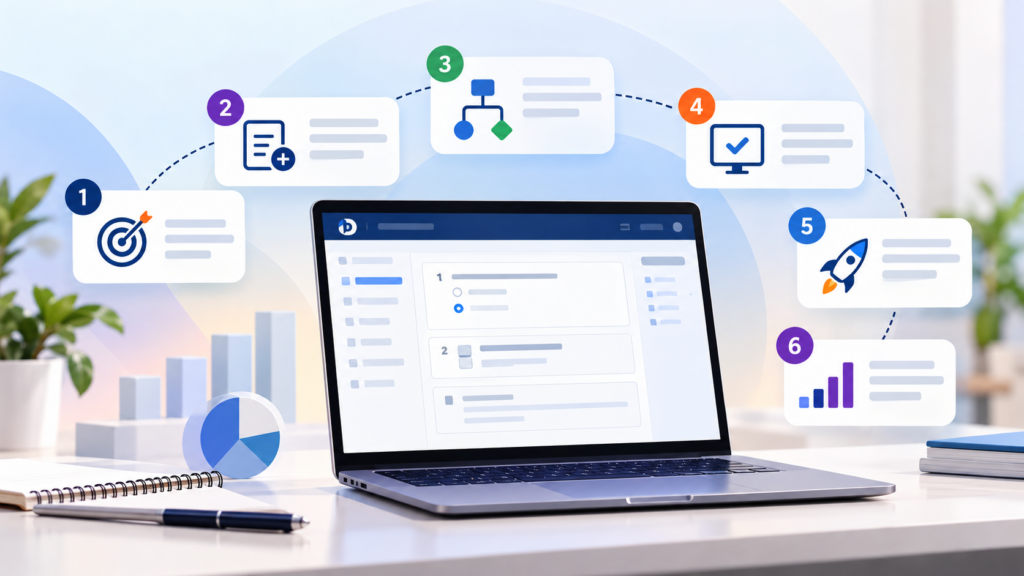
Step 1: Define Objectives
Start with the research question. Knowing what decision the data will support shapes every later choice.
Step 2: Create the Project
Set up a new survey in the Portal and name it clearly so teammates can find it easily.
Step 3: Add Questions and Logic
Build the questionnaire in the editor, adding skip logic, piping, and validation as needed. Teams handling complex builds often rely on structured survey programming practices to keep logic clean and testable.
Step 4: Test Thoroughly
Run test completes across every path. Check logic, quotas, and mobile display before launch.
Step 5: Launch and Monitor
Open the survey to respondents and watch fieldwork progress closely.
Step 6: Analyze and Report
Review results using built-in tools or export data for deeper statistical work.
For hands-on learners, a practical Decipher tool tutorial can speed up the learning curve considerably.
Key Features That Strengthen a Decipher Survey
Several features help researchers build better, cleaner surveys.
- Skip logic and branching – Show respondents only relevant questions.
- Quotas – Balance the sample across demographic groups.
- Randomization – Reduce order bias in answers and concepts.
- Piping – Insert earlier answers into later questions.
- Validation rules – Block incomplete or illogical responses.
- Multilingual support – Run one survey in many languages.
- Mobile optimization – Display correctly on phones and tablets.
Together, these tools protect data quality while improving the respondent experience.
Turn Complex Datasets Into Strategic Business Growth
Enterprise-grade data processing, statistical analysis, and customized tabulations to power your insights.
Decipher Compared With Other Survey Platforms
No platform suits every project. Comparing options helps teams choose wisely.
| Platform | General Strength | Typical Consideration |
| Decipher (Forsta) | Flexible logic and custom scripting | Learning curve for advanced features |
| Qualtrics | Large template library and integrations | Higher cost and steeper training |
| Sawtooth Lighthouse | Choice modeling like CBC and MaxDiff | Less suited to general surveys |
Pricing for Decipher typically requires a custom quote rather than a public price list. Therefore, teams should request estimates early when comparing platforms.
If you’d like a closer look at how the system fits into wider research workflows, our overview of the Decipher survey platform explores its role in more depth.
Common Uses for Decipher Surveys
The platform supports a wide range of research needs.
- Brand tracking – Measure awareness and perception over time.
- Concept testing – Compare product ideas before launch.
- Customer satisfaction studies – Capture feedback across touchpoints.
- Pricing research – Test price sensitivity through advanced exercises.
- Healthcare research – Collect structured responses from professionals and patients.
- Academic studies – Manage multi-phase research with precise controls.
Many of these projects sit inside a broader market research survey program, where consistent programming supports reliable comparisons across waves and markets.
Protecting Data Quality in a Decipher Survey
Good data starts with good design. Fortunately, the platform offers several tools to protect quality.
Validation rules prevent impossible answers, such as ages outside a realistic range. Additionally, teams can flag speeders who finish too quickly and detect straight-lining in grid questions. Duplicate controls also stop the same person from completing the survey twice.
These safeguards support sound data collection and survey practices. As a result, researchers spend less time cleaning data and more time interpreting it.
Common Mistakes to Avoid
Even skilled teams repeat avoidable errors. Watch for these pitfalls:
- Vague questionnaires – Unclear instructions lead to incorrect logic.
- Skipping testing – Untested paths cause surprises during fielding.
- Overcomplicated routing – Excessive branching confuses respondents.
- Ignoring mobile design – Poor layouts increase dropouts.
- Late changes – Edits after programming starts create inconsistencies.
Clear briefs and thorough testing prevent most of these problems before they reach respondents.
From Survey to Insight

A Decipher survey only delivers value when results turn into decisions. Once fieldwork ends, analysts often begin with cross-tabulation to compare responses across customer groups and spot meaningful differences.
For deeper analysis, teams can pick from many data analysis tools to model relationships and test hypotheses. Clean, well-labelled exports from the platform make these tools easier to use.
Organizations running recurring studies often fold this workflow into broader marketing research in services programs. This keeps wording, logic, and reporting consistent from one wave to the next.
Program Complex Questionnaires and Skip Logic
Expert survey scripting, advanced routing, and multi-language configurations for flawless data collections.
Best Practices for Better Decipher Surveys
- Finalize the questionnaire before programming begins.
- Keep surveys short, ideally under ten minutes.
- Use neutral, jargon-free question wording.
- Test every logic path and run a soft launch.
- Monitor data quality throughout fielding.
- Document logic and changes for future updates.
Following these habits builds reliable surveys and reduces costly revisions.
Conclusion
A Decipher survey offers researchers a powerful combination of flexibility, control, and scalability. From simple questionnaires to advanced multi-market studies, the platform supports projects that demand accuracy and depth.
Teams that plan carefully, test thoroughly, and monitor fieldwork closely gain cleaner data and faster turnaround. As research grows more complex, understanding platforms like this becomes a valuable advantage.
Ultimately, the best survey tool is the one that fits your project. For many demanding studies, Decipher earns its place on the shortlist.
Frequently Asked Questions
It’s a questionnaire built and managed through the Decipher platform, now part of Forsta, used for market research and data collection.
Beginners can build simple surveys with the visual editor, though advanced logic and scripting take more time to learn.
Pricing generally requires a custom quote based on project needs, so teams should contact the vendor for an estimate.
Yes, the platform supports multiple languages within a single survey while keeping logic consistent across versions.
It offers built-in reports and crosstabs for reviewing results, and data can also be exported for deeper statistical analysis.