

Fieldwork rarely happens where the internet is strong. Rural villages, basements, remote farms, and crowded markets often have weak or no connectivity. This is exactly why the SurveyToGo offline survey capability matters so much for field researchers.
At Linkinfotech, we set up and manage offline-ready surveys so field teams can keep collecting data wherever the signal drops. In this guide, we’ll explain how a SurveyToGo offline survey works, why it protects data quality, and how to set it up so fieldwork runs smoothly without a connection.
What Is a SurveyToGo Offline Survey?
A SurveyToGo offline survey is a questionnaire that surveyors complete on a mobile device without needing an active internet connection. The app stores each response locally on the device. Once connectivity returns, the data syncs to the central server automatically.
This design makes the platform especially useful for face-to-face interviewing, often called CAPI. Surveyors can move freely between locations without worrying about signal strength. Meanwhile, researchers still receive complete, organized data in one place.
Offline fieldwork depends on careful preparation. Teams usually begin with a clear survey script that defines every question, logic rule, and validation before any programming starts. This preparation matters even more offline, since fixing errors mid-fieldwork is harder.
Why Offline Capability Matters in Field Research
Connectivity gaps create real risks for data collection. Therefore, understanding why offline capability matters helps teams plan more confidently.
Here’s what a reliable offline survey delivers:
- Uninterrupted fieldwork – Surveyors keep working regardless of signal.
- No lost responses – Data stays safely stored on the device until it syncs.
- Wider geographic reach – Teams can research remote or underserved areas.
- Faster interviews – Surveys don’t wait on slow loading or dropped connections.
- Better respondent experience – Interviews flow naturally without technical pauses.
Consequently, research in rural regions or developing markets often depends on this capability to remain practical and affordable.
Turn Survey Data Into Business Decisions Faster
Technology-driven market research for faster, smarter insights.
How a SurveyToGo Offline Survey Works
The process follows a simple pattern, though each stage deserves attention.
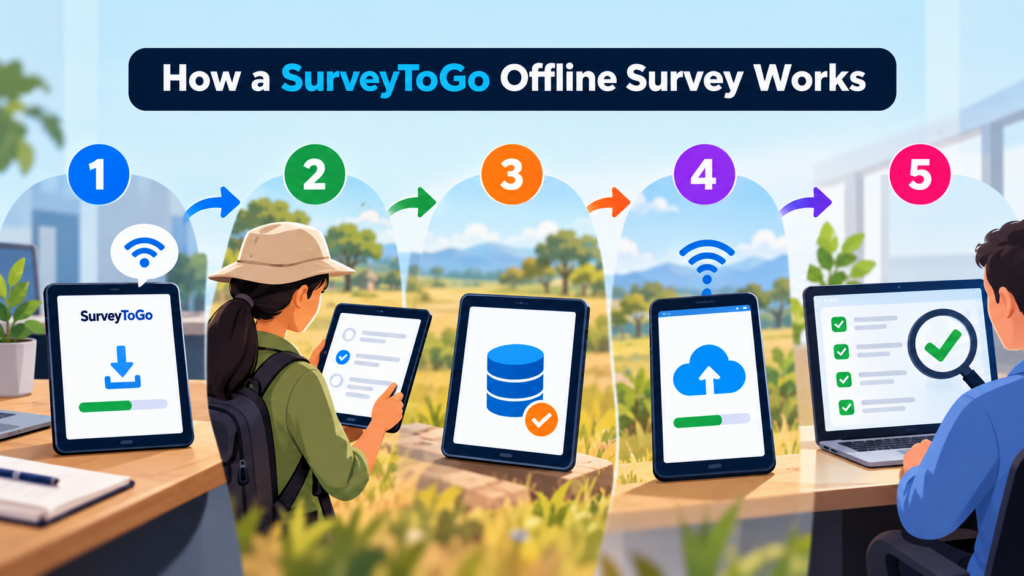
Step 1: Download the Survey
Before heading into the field, surveyors connect to the internet and download the assigned survey to their device. The questionnaire, logic, and media are stored locally.
Step 2: Conduct Interviews Offline
In the field, surveyors complete interviews as normal. The app handles skip logic, validation, and navigation without any connection.
Step 3: Store Responses Locally
Each completed interview saves directly on the device. Nothing depends on a live network at this stage.
Step 4: Sync When Connected
Once the device finds a connection, the app uploads completed interviews to the server. Supervisors can then review the incoming data.
Step 5: Review and Confirm
Finally, teams verify that all interviews arrived correctly before closing the project or removing data from devices.
The most important habit is downloading everything before leaving connectivity. A surveyor who forgets this step may arrive in the field with no usable survey.
Preparing Devices for Offline Fieldwork
Good preparation prevents most field problems. Teams should check several things before every deployment.
- Charge batteries fully – Long field days drain devices quickly.
- Free up storage space – Photos, audio, and responses need room.
- Update the app – Current versions reduce compatibility and syncing issues.
- Enable location permissions – Required if GPS capture is part of the study.
- Download the latest survey version – Outdated versions create inconsistent data.
Additionally, teams should carry backup devices or power banks. A dead battery in a remote location can halt an entire day’s work.
Designing Surveys That Work Well Offline
Survey design affects offline performance more than many teams expect. Careful survey programming helps ensure surveys stay stable and fast without a connection.
Keep logic efficient and avoid unnecessary complexity. Heavy media files, such as large images or video, can slow devices and consume storage quickly. Therefore, compress media before adding it to the survey.
Clear navigation also helps field staff. Surveyors often work in noisy, distracting environments, so simple screens and short instructions reduce mistakes. Testing the survey fully in offline mode before launch is essential.
Syncing Data Safely
Syncing is the moment when offline data becomes visible to the research team. Handling it carefully protects every interview collected.
Sync Regularly
Surveyors should upload completed interviews whenever they reach a reliable connection. Waiting too long increases the risk of losing data if a device breaks or disappears.
Avoid Deleting Data Too Early
Never clear interviews from a device until the server confirms they arrived. Confirmation protects against failed or partial uploads.
Monitor Sync Status
Supervisors should check dashboards regularly to see which devices have synced and which haven’t. Missing uploads often signal a device problem or a surveyor who forgot to connect.
Strong data collection and survey habits depend on this discipline, since offline data is only valuable once it reaches the central dataset.
Turn Complex Datasets Into Strategic Business Growth
Enterprise-grade data processing, statistical analysis, and customized tabulations to power your insights.
Quality Control During Offline Fieldwork
Working offline doesn’t mean working without oversight. Quality control tools still apply, even if some checks happen after syncing.
Features such as GPS capture, timestamps, and audio spot-checks record verification data during the interview. Once the device syncs, supervisors can review this information and flag suspicious interviews. For example, an interview completed in two minutes might signal rushed or fabricated data.
Because supervisors can’t watch every interview live, training becomes even more important. Surveyors should understand how verification works and why accuracy matters.
Common Challenges With Offline Surveys
Offline fieldwork solves one problem but introduces others. Recognizing them early helps teams prepare.
- Delayed visibility – Supervisors can’t see data until devices sync.
- Storage limits – Large media files fill device memory quickly.
- Version mismatches – Surveyors may use outdated survey versions.
- Lost or damaged devices – Unsynced data can disappear with the device.
- Surveyor errors – Skipped sync steps lead to incomplete datasets.
Fortunately, clear procedures, regular syncing, and good training reduce these risks significantly.
Offline Surveys in Market Research
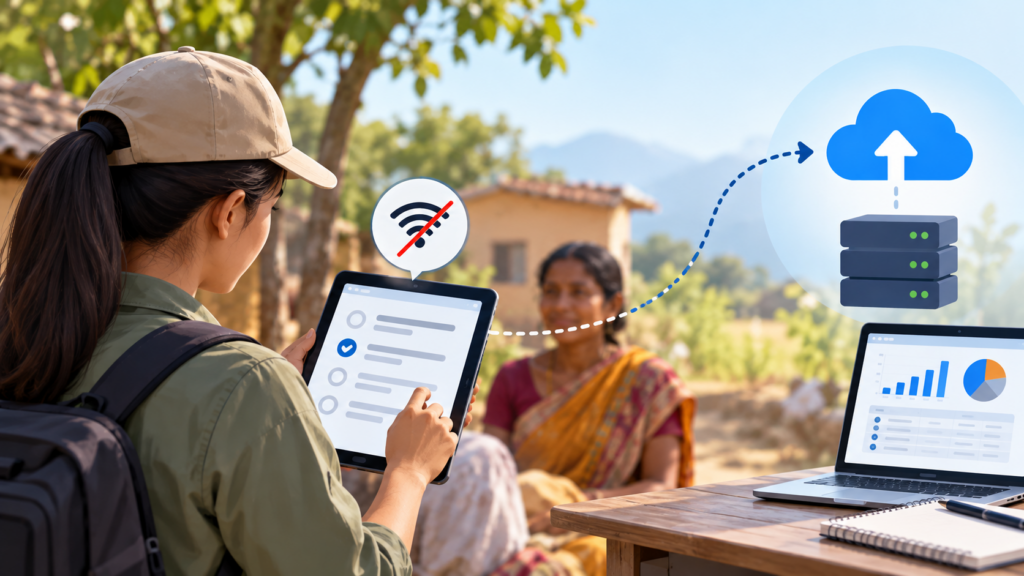
Offline capability plays an important role in large market research survey projects, especially those covering rural markets or regions with unreliable internet. Without it, entire populations might go unrepresented.
Businesses gathering customer feedback in stores, clinics, or service points also benefit. A simple service survey form completed on a tablet works even when the building has poor reception.
Organizations running ongoing field programs often fold offline collection into broader marketing research in services strategies. This keeps methodology consistent across regions and survey waves.
Offline vs. Online Survey Platforms
Not every project needs offline capability. Choosing the right approach depends on where and how data will be collected.
| Factor | Offline-Capable Platform | Online-Only Platform |
| Connectivity needed | Only for download and sync | Constant connection |
| Best for | Field interviews, remote areas | Web panels, online respondents |
| Data safety | Stored locally until synced | Stored on server immediately |
| Supervision | Delayed until sync | Real-time visibility |
| Typical method | CAPI | CAWI |
Teams comparing options may also explore the Decipher survey platform, which suits online research well, or follow a Decipher tool tutorial to understand how online-first tools differ from field-first systems.
From Offline Data to Analysis
Once all interviews sync, the focus shifts to analysis. Clean, consistent offline data moves into reporting with less preparation, which saves valuable time.
Analysts can then apply various data analysis tools to explore patterns, compare regions, and test hypotheses. Consistent formatting across devices and surveyors makes this stage far smoother.
Before analysis begins, teams should confirm the dataset is complete. Comparing the number of synced interviews against field records quickly reveals any missing uploads.
Program Complex Questionnaires and Skip Logic
Expert survey scripting, advanced routing, and multi-language configurations for flawless data collections.
Best Practices for SurveyToGo Offline Surveys
- Download the final survey version before entering the field.
- Test the survey fully in offline mode before launch.
- Charge devices and carry backup power.
- Sync data at every opportunity with a reliable connection.
- Confirm uploads before deleting anything from devices.
- Train surveyors on both the survey and the sync process.
- Review quality control data soon after each sync.
Following these habits keeps offline fieldwork organized and protects every interview collected.
Conclusion
A SurveyToGo offline survey lets researchers collect reliable data wherever fieldwork takes them, regardless of signal strength. By storing responses locally and syncing later, the platform removes one of the biggest barriers to remote research.
Teams that prepare devices carefully, design surveys thoughtfully, and sync data consistently ultimately gain complete, trustworthy datasets. As research expands into harder-to-reach areas, offline capability will remain a practical necessity.
Ultimately, a strong offline workflow turns unreliable connectivity from a threat into a manageable detail.
Frequently Asked Questions
Yes, surveyors complete interviews offline, and the app stores responses locally until a connection becomes available for syncing.
Data uploads when the device connects to the internet and the surveyor syncs, either automatically or by starting the sync manually.
Download the latest survey version, charge devices, free up storage, and confirm the app is updated while you still have a connection.
Unsynced data may be lost with the device, so regular syncing is important to protect completed interviews.
Logic and validation work normally offline, and verification data like GPS and timestamps can be reviewed once interviews sync.